
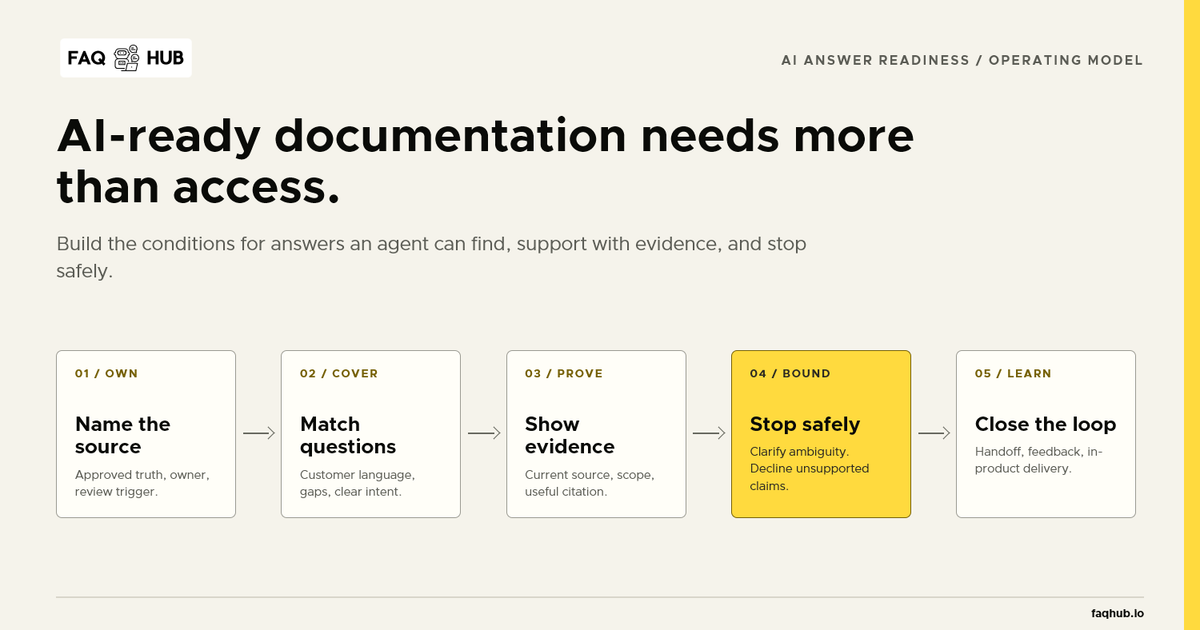
AI-ready documentation is not simply content an automated crawler can open. It is product knowledge an answer system can find, interpret, support with evidence, and stop using when the evidence runs out.
That distinction matters for SaaS support. A help centre may be public and indexed while still containing duplicate policies, mixed product versions, vague titles, stale screenshots, and pages that never answer the question a customer asked. Connecting that material to an AI assistant makes retrieval faster; it does not make the source trustworthy.
The short answer
Make one reviewed source authoritative for each important support answer. Organise pages around real customer questions. Keep each answer focused, current, and traceable to evidence. Define what the assistant must not infer, preserve a route to a person, and use unanswered questions to decide what to improve next.
You can check those conditions with the free AI Answer Readiness Audit. The rest of this guide explains what each signal means and how to fix it.
What does AI-ready documentation mean?
Documentation is AI-ready when it supports the complete answer journey:
- The system can discover the relevant source.
- The source matches the customer’s question and product context.
- The answer can point back to identifiable evidence.
- Missing or conflicting evidence produces a controlled no-answer path.
- A human receives enough context to continue when escalation is needed.
- The failed question becomes input for future documentation work.
Machine-readable HTML helps with the first step. It does not solve the other five.
This is why “optimising documentation for AI” should not become a formatting exercise. Headings, summaries, and structured markup are useful, but source ownership and answer boundaries carry more risk than whether a page has the perfect schema property.
1. Establish one approved source for each answer
Start with ownership, not rewriting.
Pricing, permissions, account recovery, integrations, data handling, and cancellation rules often appear in several places. A marketing page, sales deck, support macro, release note, and old PDF may each contain a slightly different version.
Choose which source governs the answer. Record its owner and the event that should trigger a review. If two active sources disagree, do not blend them into a smoother response. Resolve the conflict or mark the answer as unavailable.
For a practical cleanup sequence, use How to Clean Up a Knowledge Base Before Launching AI Support.
2. Build coverage from customer questions
An internal product taxonomy rarely matches the language customers use.
A page filed under “Identity and workspace administration” may contain the right information, while customers search for “How do I invite a contractor?” or “Why can’t this person publish?” The documentation needs to preserve the product model while exposing clear routes from those real questions.
Collect recurring questions from tickets, searches, onboarding calls, chat transcripts, sales objections, and product reviews. Map each question to one of four states:
- a current answer exists and is easy to find;
- a current answer exists but uses different language;
- several sources conflict;
- no approved answer exists.
The FAQ Coverage Gap Audit can turn product areas into a first backlog. It does not prove demand by itself; use your own support evidence to rank the result.
3. Give each page one clear job
Long pages are not inherently bad. Mixed-intent pages are harder to retrieve and harder for a customer to scan.
A useful support article should make its job obvious from the title and opening. Put prerequisites before instructions. Keep plan limits and product-version constraints beside the relevant step. State the expected result, then provide the next action when the result does not appear.
Split a page when two sections answer different questions, serve different roles, or require different permissions. Keep it together when the steps form one task and separating them would remove necessary context.
4. Make evidence visible
An answer can sound accurate without being inspectable. AI-ready support should let a customer or reviewer see which published article supports the response.
Useful evidence has an identifiable source, a current revision, the right product scope, and enough surrounding context to support the claim. A citation to a page that does not contain the answer is decoration, not grounding.
Test this manually. Ask a question, open every source supplied with the response, and find the exact statement that supports each material part. If the answer adds a plan limit, exception, or instruction absent from those sources, the evidence chain has failed.
5. Define the answer boundary
Documentation is ready for AI only when the system knows what to do with insufficient evidence.
Test three cases:
- Supported: one current source answers the question directly.
- Ambiguous: relevant sources exist, but they conflict or leave a material condition unclear.
- Unsupported: no approved source answers the question.
The expected result is not three fluent answers. The supported question should produce an answer with useful evidence. The ambiguous question should expose the uncertainty or ask for clarification. The unsupported question should decline to invent an answer and offer the next route.
The companion guide, How to Test Whether an AI Support Answer Is Grounded, provides a repeatable test script.
6. Preserve context during human handoff
“Contact support” is not a complete fallback if the customer has to repeat the question in another channel.
Decide what the responder needs: the conversation, current page, product area, account context where appropriate, sources already shown, and the reason the assistant stopped. Keep the authoritative transcript in the support system rather than relying on a notification message as the only record.
See When AI Support Cannot Answer: Human Handoff Without Starting Over for the full handoff checklist.
7. Connect publication to product change
An AI-ready launch can decay quickly when documentation remains separate from product delivery.
Changes to workflows, permissions, pricing, or integrations should trigger a documentation decision. Teams that keep source material in Git can review the content beside code, then reconcile approved changes into the customer-facing system. Teams that write directly in a CMS still need owners, review states, and release triggers.
The interface matters less than the control: compare current state, review the proposed change, create a draft, publish deliberately, and retain a way to detect conflicts. Manage FAQ Hub Content with MCP or REST shows that workflow in detail.
8. Deliver the same approved answer where work happens
Customers should not receive one answer in the portal and a different answer in an embedded assistant.
Use one publication lifecycle for the customer-facing portal, search, in-app help, and grounded chat. This does not mean every surface must display identical formatting. It means they should resolve to the same approved facts and revision.
Test one update end to end. Change a policy sentence in a draft, publish it, then check the portal, search result, embedded experience, citation, and agent view. Record where stale copies remain.
9. Turn failures into documentation work
The most useful AI-support analytics are not vanity conversation totals. They show where the content system failed.
Review:
- questions with no supported answer;
- searches that return no useful result;
- answers customers mark as unhelpful;
- conversations escalated after an article was shown;
- articles repeatedly opened before a ticket;
- product changes without an owned documentation update.
Each signal should produce a decision: add an article, retitle an existing page, resolve a policy conflict, improve the next action, or accept that the question belongs with a person.
10. Test readiness with one real support journey
Do not begin by importing every document.
Choose one question your team answers every week. Gather the sources currently used to answer it. Check whether a customer can find the answer, verify the evidence, complete the next step, and reach a person with context when the source is insufficient.
That bounded test reveals more than a large content migration. It exercises discovery, structure, evidence, boundaries, delivery, and handoff in one journey.
FAQ Hub’s Support & Docs Reset starts from that same constraint. You send one repeated question and the sources you already use; FAQ Hub scopes one approved answer path before paid work begins.
An AI-ready documentation checklist
Before connecting support content to an answer system, confirm that:
- every important answer has an approved source and owner;
- article titles reflect the language customers use;
- each page has one clear support job;
- product, plan, role, version, and locale constraints remain explicit;
- generated answers can point to evidence that actually supports them;
- ambiguous and unsupported questions do not produce invented certainty;
- human escalation preserves useful context;
- publication updates every customer-facing answer surface;
- failed searches and conversations become owned content work;
- one real customer journey has passed end-to-end testing.
AI readiness is not a one-time score. It is the operating condition that lets an answer system use product knowledge without outrunning the people and processes responsible for its accuracy.
Start with the free AI Answer Readiness Audit, then test the weakest signal against one question customers already ask.