FAQ Hub separates two decisions that are often bundled together:
- Where should customers receive support?
- How should your team create, review, publish, and automate the knowledge behind it?
That separation matters. Your support experience can live on a hosted portal, inside your SaaS, or in both places, while FAQ Hub CMS remains the shared source for published articles, search results, and grounded AI answers.
The short answer
FAQ Hub can provide your SaaS with support through:
- a hosted knowledge portal on an FAQ Hub subdomain;
- a verified custom help domain;
- an inline help portal embedded inside your product;
- a floating AI chat widget;
- Command-K search for fast article discovery.
The same published content powers each surface. Your team manages that content in FAQ Hub CMS, or keeps authoring in Git and uses a configured MCP-capable workflow to propose and apply controlled updates.
Choose the support experience, not another content silo
Hosted knowledge portal
Each product can have a dedicated knowledge portal such as your-product.app.faqhub.io. A verified custom domain can give customers a familiar destination such as help.yourcompany.com.
The portal is useful when customers need a complete support destination: categories, articles, navigation, search, branding, feedback, and chat in one place. FAQ Hub resolves the incoming domain to the correct product, so published content remains tenant- and product-scoped.
Inline help portal
The inline portal mode places help content inside an existing page in your SaaS. It is useful for support centres, onboarding screens, settings areas, or any workflow where sending the user to another tab would break their concentration.
The embedded frame reuses the same portal layouts, navigation, search, labels, styling, and backend data flow as the hosted experience. It is not a second knowledge base that must be maintained separately.
Floating AI chat
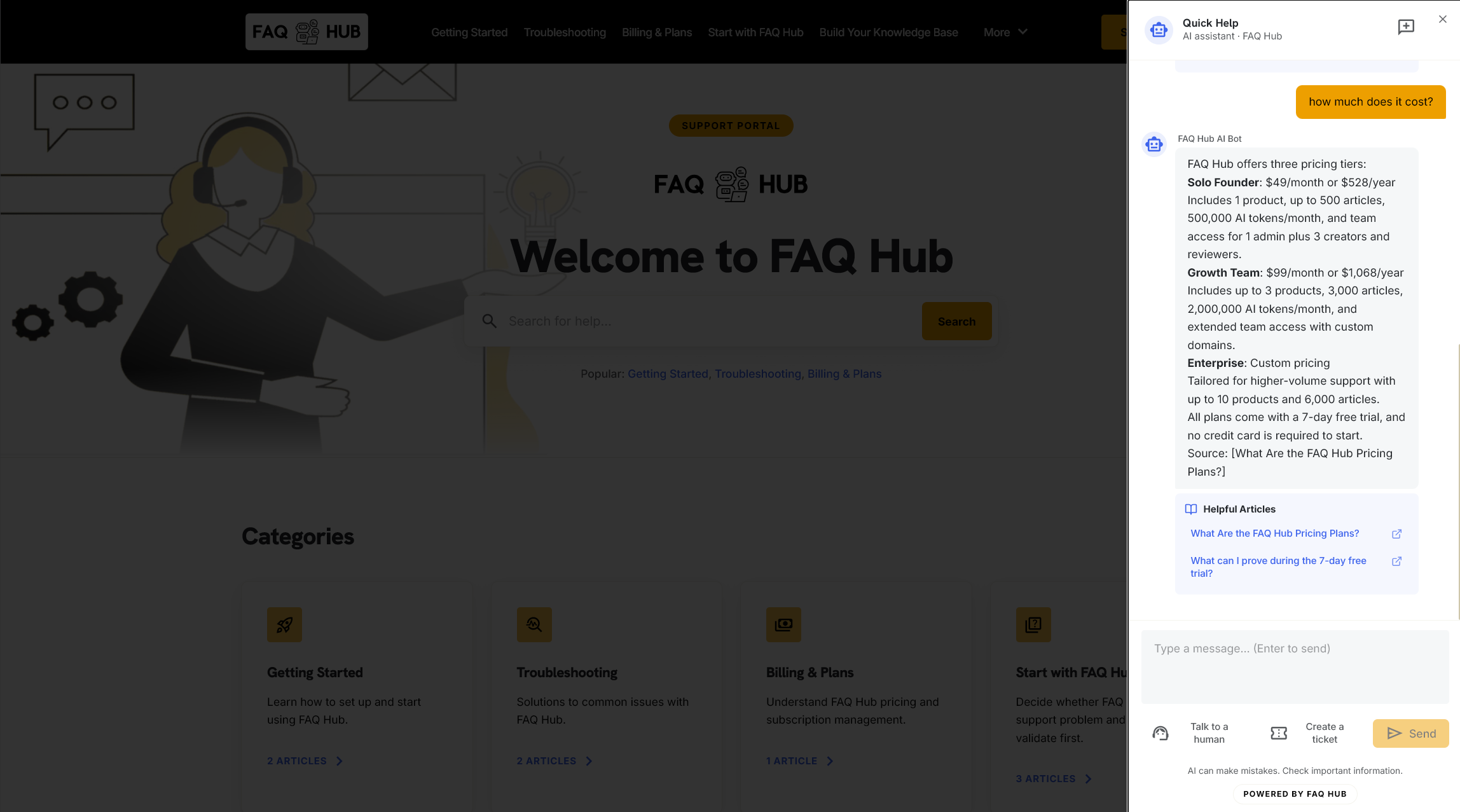
The chat mode adds an on-page support assistant. It retrieves answers from the product’s published FAQ Hub knowledge and can include useful article links. When the available evidence does not support a definitive answer, the assistant discloses the gap and offers a ticket rather than presenting a guess as fact.
Visitors can also request a human directly. Escalation stays linked to the active conversation, allowing staff to inspect the stored thread and surrounding page or search context.
Command-K search
Command-K mode provides a lightweight search overlay opened with Ctrl+K or Cmd+K. It gives users fast article discovery without requiring a permanently visible portal or chat panel.
Together, these options support a hybrid model: a full portal for browsing, inline help at high-friction product moments, chat for natural-language questions, and keyboard search for experienced users.
FAQ Hub CMS is the shared knowledge source
The delivery surface is only the last step. The useful part is having one controlled content lifecycle behind every surface.
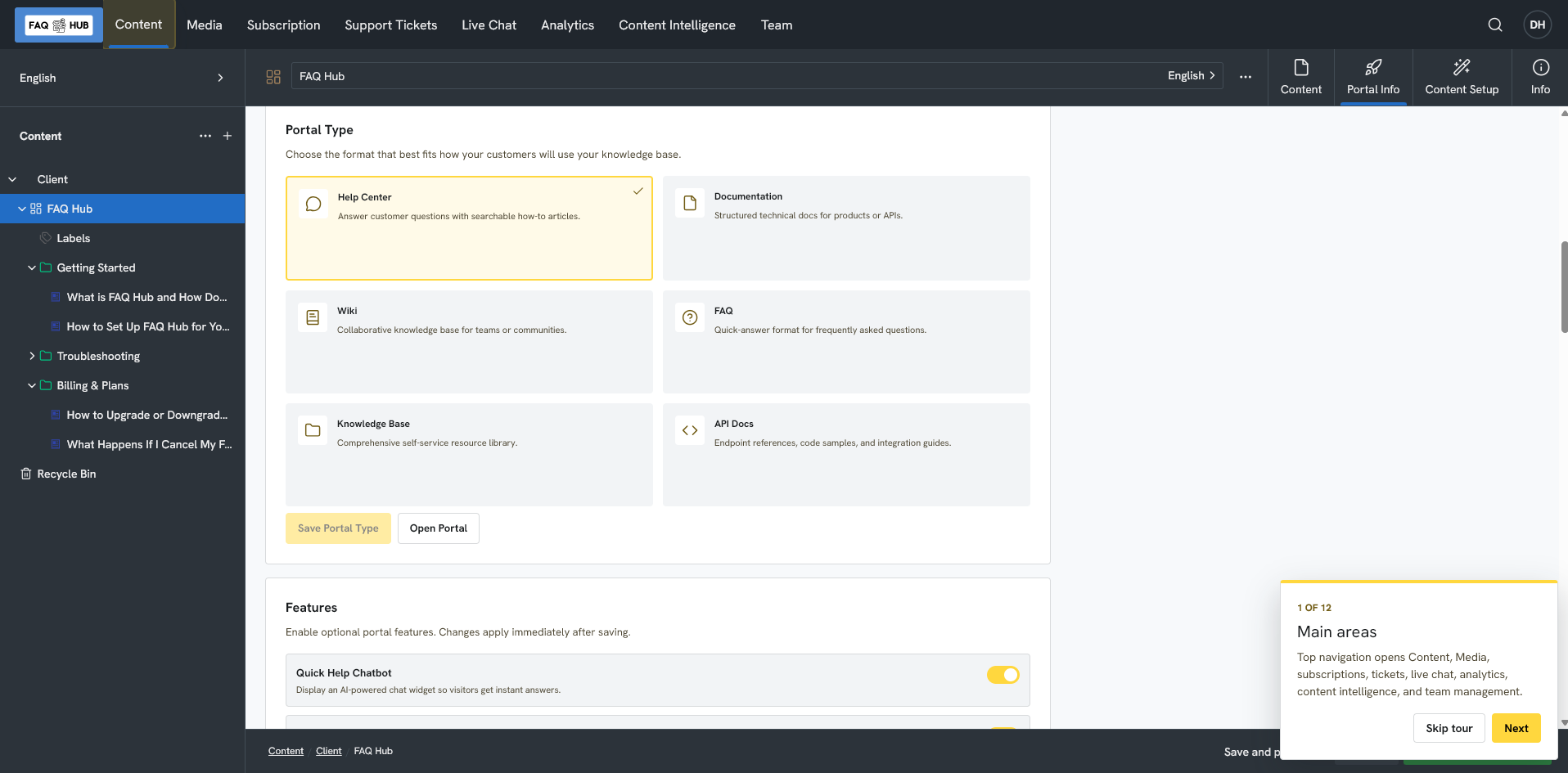
FAQ Hub CMS organises knowledge by client, product, category, and article. Teams can:
- author and edit articles in the backoffice;
- import supported documents and structured content;
- create or update drafts after onboarding;
- apply product branding and select the most appropriate portal layout;
- review content before publication;
- publish, unpublish, or archive content through controlled lifecycle operations;
- use content quality checks to identify stale, orphaned, contradictory, or poorly linked material;
- use AI-assisted editing as a proposal rather than an invisible automatic rewrite.
Drafts remain private. The portal and widgets consume published content, so an unfinished pricing update does not become a customer answer simply because somebody saved it.
That is the practical meaning of a CMS in an AI support system: it is not just a text editor. It is the publication boundary between internal work and customer-trusted knowledge.
Automate the workflow without giving automation direct control
Many product teams already store documentation as Markdown in Git. That is a sound approach because pull requests provide history, review, and a natural place to update documentation beside code.
The weak point is often the custom job that pushes those files into a knowledge base. A basic copy script usually has to answer difficult questions:
- Is this article new, renamed, moved, unchanged, or conflicting?
- Which fields belong to Git and which remain editorially managed?
- Is the destination the correct tenant and product?
- Can the job create drafts without gaining publication rights?
- Will a retry duplicate content?
- What refreshes search, chat, and portal caches after publication?
FAQ Hub’s MCP content workflow provides that control layer.
An MCP-capable client or pipeline reads the chosen repository files and prepares structured content. FAQ Hub then compares the proposed state with the current CMS state, produces a reviewable plan, applies approved changes as drafts, and keeps publication as a separate authorised step.
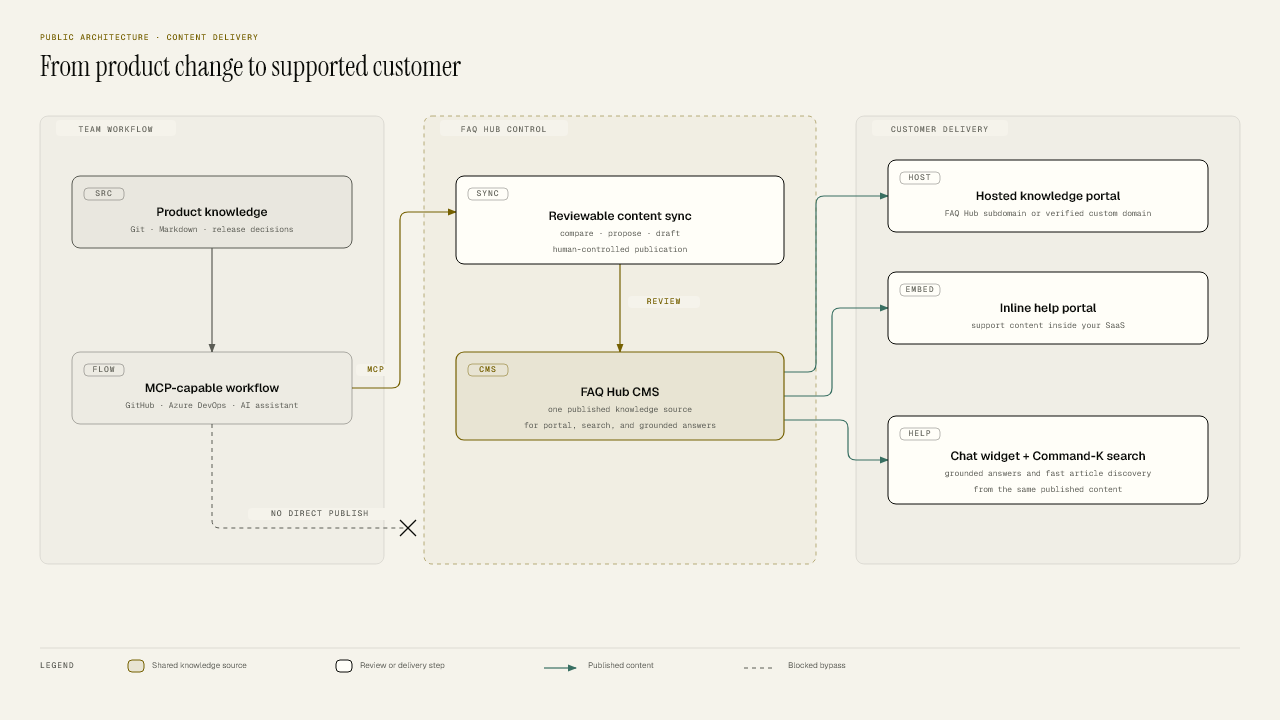
The public architecture is intentionally simple:
- Product knowledge changes in Git, Markdown, or another team-owned source.
- A configured GitHub, Azure DevOps, or AI-assisted workflow reads that source.
- MCP carries a structured proposal into FAQ Hub’s controlled sync process.
- The team reviews creates, updates, moves, conflicts, and retirement candidates.
- Accepted changes become drafts in FAQ Hub CMS.
- An authorised publish step makes the approved revisions available to customer support surfaces.
The workflow does not give a repository or AI assistant a direct route to public content. It also does not require FAQ Hub to know the internal shape of your engineering repository.
What you still own
FAQ Hub is not currently a turnkey GitHub or Azure DevOps repository watcher. Your team still chooses:
- which repository and branches contain customer-facing documentation;
- which Markdown files map to categories and articles;
- how Markdown and frontmatter become the structured content manifest;
- whether synchronization runs interactively, after merge, on a schedule, or through an approval gate;
- who may apply drafts and who may publish.
Keep the FAQ Hub product key in the platform’s secret store rather than the repository. GitHub supports Actions secrets. Microsoft recommends secret variables, variable groups, or Azure Key Vault for Azure Pipelines and advises mapping secrets into environment variables rather than printing or passing them on the command line.
This division of responsibility is useful. GitHub and Azure DevOps remain responsible for source events and approvals. FAQ Hub remains responsible for safe content reconciliation and customer delivery.
What happens after publication
Publishing updates the shared knowledge lifecycle. The hosted portal and embedded experiences receive the new article data, search is refreshed, and grounded chat starts retrieving from the updated published knowledge.
There is no separate “train the chatbot” upload for every wording change. The assistant queries the product’s current published content when handling substantive questions.
A practical SaaS operating model
For most SaaS teams, a useful setup looks like this:
- Host the full portal for browsing, search, and indexable help content.
- Embed inline help beside complex workflows such as billing, permissions, or integrations.
- Add chat and Command-K for users who know the question but not the article title.
- Keep FAQ Hub CMS authoritative for publication, even if Markdown in Git remains authoritative for selected fields.
- Require documentation in the same change process as the product. A changed workflow or plan should not be complete until its support content is updated.
- Use MCP to plan and apply drafts, then reserve publication for the appropriate reviewer or release step.
- Feed unanswered questions back into the backlog so support gaps become owned content work.
This makes documentation an active part of product delivery rather than an archive maintained after customers complain.
The outcome
FAQ Hub gives a SaaS team one managed knowledge source and several ways to deliver it. Customers can browse a hosted portal, use help inside the product, ask a grounded assistant, or search without leaving their workflow.
Teams that prefer docs-as-code can keep Git and their existing review habits. FAQ Hub adds the content control plane between a repository change and a public answer: comparison, draft creation, publication boundaries, audit, and coordinated delivery.
That is the improvement over a custom Markdown copy job. The repository remains useful, but the job no longer has to become an undocumented CMS, deployment system, and chatbot refresh pipeline of its own.
Continue with: