
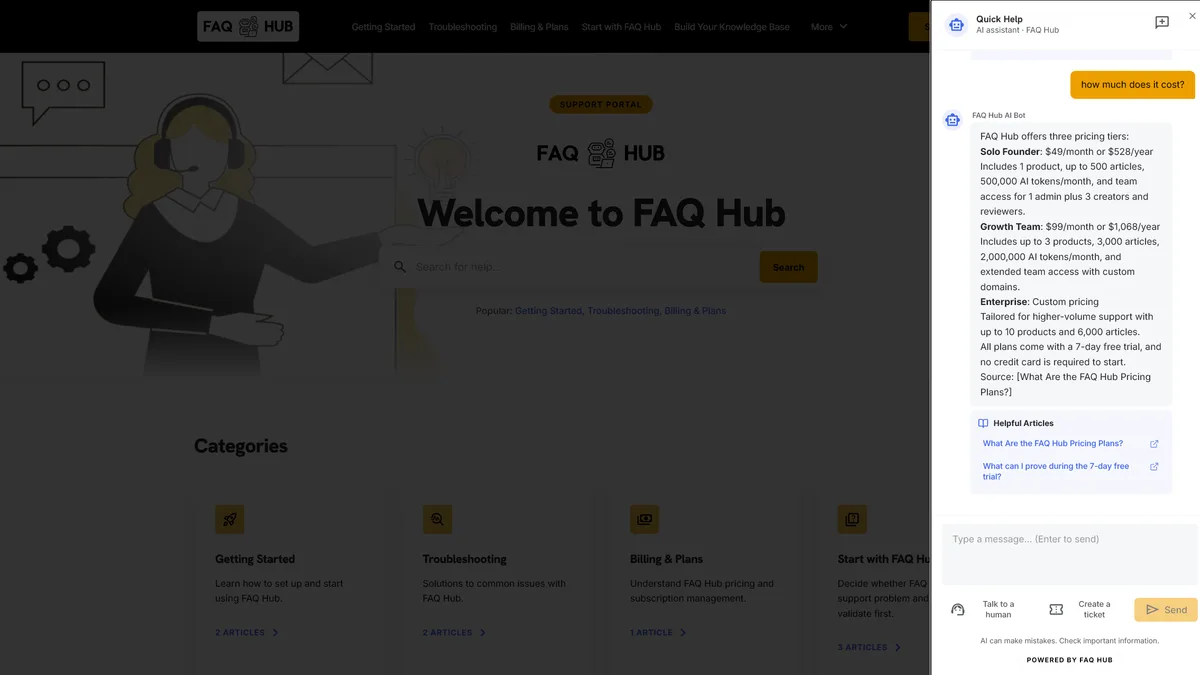
A live chat feature gives users a real-time support conversation inside a website or product. The visible chat panel is only one part of it. The feature also needs identity, routing, message history, notifications, knowledge retrieval and a reliable way to move from automation to a person.
For a SaaS team, the best live chat experience is not the one that opens most often. It is the one that resolves the user’s current task with the least disruption and carries the context forward when a human needs to take over.
What is a live chat feature?
A live chat feature is an embedded interface for exchanging support messages while a user is active on a page or inside an application. It may connect the user directly to a support agent, start with automated answers, or combine both modes.
A complete implementation usually includes:
- a launcher or inline entry point;
- a conversation panel that works on desktop and mobile;
- user, account and page context;
- a searchable knowledge source for immediate answers;
- message persistence across navigation or refreshes;
- availability and response-state messaging;
- human routing, notifications and agent replies; and
- ticket creation when real-time support is unavailable.
This is different from placing a contact form in a pop-up. Live chat is a continuing conversation with visible state and ownership.
User journeys a SaaS live chat feature should support
Start with the situations in which chat removes friction. A launcher added to every page without a journey model often becomes a noisy route to the same support queue.
A user is blocked during setup
The chat should know the page and, where appropriate, the product area or onboarding step. It can offer a relevant article or answer before asking the user to repeat information already available to the application.
A user has a specific product question
Natural-language chat works well when the user knows the question but not the article title. A grounded answer should include links to the supporting content so the user can check the details or follow a longer procedure.
A user needs account-specific help
Public documentation may explain a policy without resolving an individual case. The conversation should recognise that boundary, avoid exposing sensitive account data and route the user to an authorised person or secure workflow.
A user reports a fault
Collect the affected page, time, product area and the user’s description. Do not make people answer a long diagnostic questionnaire before they can report that something is broken. Gather additional details only when they change the next action.
A user returns to an open conversation
Persist the thread and make its status clear. If a session has expired or a new chat has started, say so instead of implying that the previous context is still active.
Live chat UX best practices
Place chat near the task, but keep it out of the way
Use a stable launcher that does not cover navigation, form controls, cookie notices or mobile browser controls. Keep the closed state compact. When open, give the panel enough room for readable messages, source links and handoff controls without hiding the entire workflow.
Inline help can be better than a floating panel on complex setup screens. A Cmd+K or Ctrl+K menu can be better for experienced users who want fast article search. The right surface depends on the task, not on a preference for chat bubbles.
Set expectations before the first message
Tell the user whether the first responder is AI, a person or a queue. Show when human support is available and what will happen outside those hours. Avoid a green status indicator that implies an immediate human response when only automation is active.
Keep answers short and inspectable
Answer the question first. Link to the relevant article for prerequisites, full steps or policy detail. When AI is involved, show useful citations rather than asking the user to trust an untraceable paragraph.
Preserve the user’s work
Opening or closing chat should not reload the page, reset a form or move the user’s scroll position. Draft messages should survive an accidental close where practical. Links should not destroy the active conversation.
Make escalation obvious
Do not hide human support behind repeated failed prompts. Provide a labelled control such as Talk to a human or Create a ticket, then explain what context will be shared and what response the user should expect.
Design every state
The empty, loading, streaming, offline, failed, escalated and closed states all need explicit copy and behaviour. Test slow networks and provider failures. A silent spinner is not a support experience.
Connect live chat to a verified knowledge base
Live chat and a knowledge base solve different parts of the same journey. The knowledge base holds reviewed answers; chat helps a user retrieve the right one in context.
A useful flow is:
- The user asks a question inside the product.
- The system searches content scoped to that product.
- It returns a direct answer with supporting article links when the sources are sufficient.
- It discloses the gap when the sources are insufficient.
- The user chooses a human conversation or ticket without starting over.
- Repeated unanswered questions become owned documentation work.
Keep draft content out of customer answers. A saved pricing change or unfinished workaround should not become live chat guidance until somebody with publishing authority approves it.
Technical implementation checklist
Loading and performance
- Load the chat bundle asynchronously and keep it off the critical rendering path.
- Reserve stable space for launchers and panels so they do not cause layout shifts.
- Lazy-load conversation code and media that are not needed before interaction.
- Measure bundle size, interaction latency and impact on Core Web Vitals in the host product.
Security and privacy
- Scope every conversation and knowledge query to the correct tenant and product.
- Authenticate account-specific actions instead of trusting identifiers supplied by the browser.
- Minimise personal data in transcripts and define retention and deletion rules.
- Protect message rendering against unsafe HTML, links and prompt-manipulation content.
- Keep API keys and service credentials out of the client bundle.
Context and persistence
- Attach only the page, product and account context needed for support.
- Store messages in order with clear AI, visitor and human identities.
- Define when a session continues, expires, closes or becomes a new conversation.
- Make ticket and live-agent records link back to the authoritative transcript.
Accessibility
- Give the launcher an accessible name and visible keyboard focus.
- Move focus into the panel when it opens and return focus when it closes.
- Announce new messages without reading an entire streaming response repeatedly.
- Support keyboard navigation, zoom, reduced motion and narrow mobile screens.
- Do not use colour alone to distinguish AI, human and system messages.
Operations
- Route human requests by product, account or issue where that information is reliable.
- Notify staff without making Slack, Teams or email the only conversation record.
- Expose delivery failures and unanswered questions to support operators.
- Test provider outages and the fallback ticket path before launch.
When to hand the conversation to a human
Automation should stop when the answer depends on judgement, private account state or missing evidence. Common triggers include:
- the user asks for a person;
- the knowledge source does not support a definitive answer;
- the issue involves billing disputes, security, access or sensitive account changes;
- troubleshooting has repeated without progress;
- sentiment or language indicates that another automated turn will add friction; or
- the user needs an exception rather than an explanation of policy.
The handoff payload should include the active transcript, current page, useful search or article context, contact details supplied by the user and a clear reason for escalation. Keep the full transcript in the support system of record; notification channels can receive a bounded summary.
The human handoff guide explains session boundaries, ticket context and what a responder should receive.
How FAQ Hub approaches live chat
FAQ Hub combines a hosted knowledge base with embedded support. Teams can start from supported documents, review content in the CMS and deliver published answers through a floating widget, inline portal or Cmd+K search.
The chat experience retrieves from product-scoped published content and includes useful source links. When the evidence does not support an answer, the visitor can request a person or create a ticket from the same conversation. FAQ Hub’s no-code onboarding is designed to produce a starting portal in minutes, but source selection and editorial review still determine whether the answers are trustworthy.
This model suits lean SaaS teams that need a working live chat feature without building the content system, retrieval layer, support interface and handoff workflow separately.
Metrics that reveal whether live chat works
Measure the journey, not the number of chat windows opened.
- Resolved conversations: chats that answer the question without repeat contact.
- Escalation rate by intent: which product areas regularly need a person.
- Time to human response: measured from the user’s request for a person, not from widget load.
- Unanswered and unsupported questions: candidates for new or corrected content.
- Citation use: whether users open supporting articles and complete the next step.
- Repeat contact: the same user returning with the same problem.
- Task completion: whether the user finishes the workflow that prompted the chat.
- Performance and accessibility: load cost, interaction delay, errors and keyboard completion.
Deflection needs care. A conversation that ends without a ticket may be resolved, abandoned or deferred. Pair that number with feedback, repeat contact and task completion before treating it as success.
A practical launch sequence
- Choose two or three high-friction user journeys.
- Clean and approve the knowledge needed for those journeys.
- Add chat to staging with page and product context.
- Test common questions, unsupported questions and direct requests for a person.
- Verify mobile, keyboard, slow-network and provider-failure states.
- Train the support team on routing, transcript ownership and closure.
- Launch to a bounded audience and review unresolved questions each week.
Make that weekly review operational: assign each repeated failure to a content owner, a product owner or the support queue, then retest the original wording after the fix ships.