Why Modern SaaS Platforms Are Replacing Monolithic Help Desks with Embedded AI Support Widgets
Traditional support suites lock you into expensive per-seat pricing and force users away from your product.
For the better part of a decade, the B2B SaaS playbook for customer support has remained stubbornly static. You build a great product, you realize your users need help navigating it, and you staple a monolithic help desk—like Zendesk, Intercom, or Freshdesk—onto your application.
This approach forces a massive compromise in user experience. When a user encounters friction, they are forced to leave your application's context, navigate to an external support.yourdomain.com subdomain, dig through a rigid directory of articles, and then mentally toggle between tabs to apply the solution. If the documentation fails, they open a ticket and wait for a human agent.
This workflow is bloated, expensive, and hostile to user retention. In a modern SaaS environment where time-to-value is the primary metric of success, forcing users to context-switch to solve a problem is a critical failure.
Today, engineering and product teams are abandoning these heavy, tightly coupled monoliths in favor of decoupled support architectures. By leveraging lightweight, embedded AI support widgets—like the systems pioneered by FAQ Hub—teams can deliver zero-latency, highly accurate support directly inside the host application.
Here is a technical teardown of why modern SaaS platforms are ripping out legacy help desks and shifting to embedded AI widgets, and why your engineering team should follow suit.
The Shift to Decoupled Support Architecture
Legacy support platforms are monoliths. They tightly couple the content authoring environment (the WYSIWYG editor), the database (where articles are stored), the search infrastructure, and the frontend rendering layer (the external help center portal).
Because these systems are tightly coupled, you have zero control over the rendering layer and minimal control over the search algorithms. If the vendor’s search is built on outdated lexical matching (like basic TF-IDF or BM25), your users will suffer from poor search relevance, and you cannot swap out the underlying search engine without migrating off the entire platform.
A decoupled support architecture fundamentally breaks this monolith into discrete, interchangeable microservices:
- The Content Layer (Headless): Support documentation is treated as structured data. It can live in a headless CMS, a Git repository (using Markdown/MDX), or a specialized knowledge base API. This allows engineering and technical writing teams to use modern CI/CD pipelines to version-control documentation alongside the codebase.
- The Intelligence Layer (Backend RAG): Instead of relying on a vendor’s black-box search engine, documentation is chunked, converted into vector embeddings, and stored in a vector database. This powers semantic search and context retrieval.
- The Presentation Layer (Frontend Widget): The actual user interface is reduced to a highly optimized, universally compatible JavaScript widget embedded directly into the host application.
This decoupled approach grants total freedom. Marketing and support teams retain an intuitive authoring environment on the backend, while engineering maintains absolute control over the frontend runtime, styling, and application performance. You are no longer held hostage by the technical debt of a monolithic vendor.
How In-App AI Widgets Drive 80%+ Ticket Deflection
The ultimate goal of any support infrastructure is ticket deflection—solving the user's problem before it requires human intervention. Monolithic portals fail at deflection because they rely on keyword-matching search bars that require users to guess the exact terminology used by your technical writers.
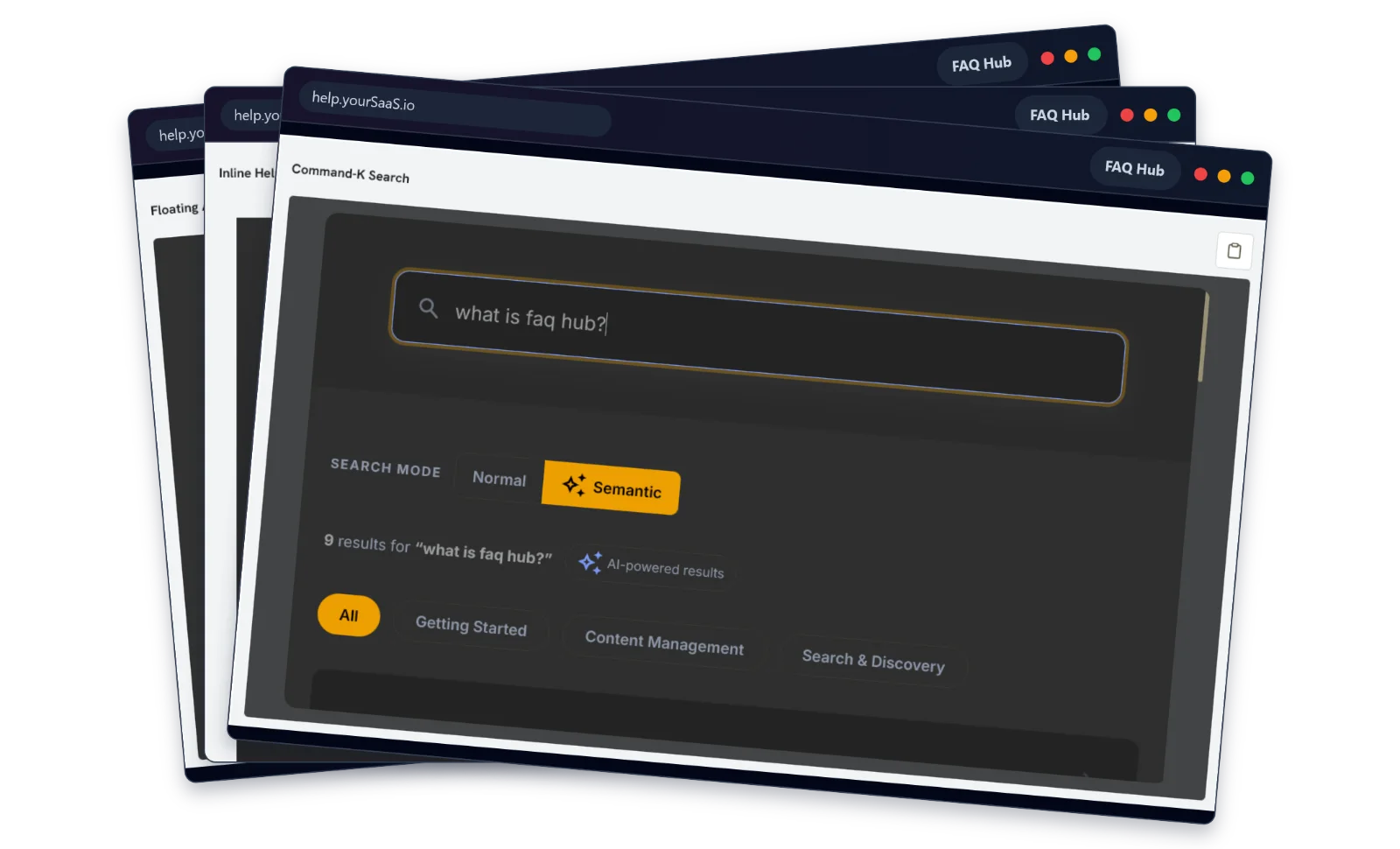
Embedded AI widgets change the deflection paradigm by meeting the user at the exact moment of intent via floating chat and inline portals, powered by Retrieval-Augmented Generation (RAG).
The Mechanics of RAG in Support Widgets
When a user opens an embedded widget and types, "Why is my API key failing in the production environment?", a legacy system searches for the keywords "API," "key," and "failing." It likely returns a generic article on "How to generate an API key." The user, frustrated, opens a support ticket.
An embedded AI widget operates entirely differently:
- Semantic Embedding: The user's natural language query is passed to an embedding model (e.g., OpenAI’s
text-embedding-3-small), which translates the query into a high-dimensional vector array. - Vector Similarity Search: The system queries your vector database for documentation chunks that are semantically nearest to the user's intent, rather than structurally identical in phrasing. It finds the specific paragraph mentioning that production environments require a
v2token prefix. - LLM Synthesis: The retrieved chunks are injected into the context window of a Large Language Model (LLM) alongside a strict system prompt instructing the model to act as a support agent and answer only using the provided context.
- In-App Delivery: The widget streams the synthesized, highly specific answer directly back to the user inside the host app in real-time.
Because this happens instantly and inline, the user never loses their context. They read the answer, fix their API key, and continue using your software. By removing the friction of the external portal and the inaccuracy of keyword search, modern AI widgets routinely achieve deflection rates exceeding 80%.
Technical Breakdown: Encapsulation, Latency, and Core Web Vitals
A common objection from engineering leads when asked to integrate third-party tools is the risk of introducing bloat, CSS conflicts, or main-thread blocking scripts. Legacy chat widgets (like older versions of Intercom) were notorious for downloading megabytes of unused JavaScript, severely degrading page load speeds.
Modern embedded widgets solve this through Shadow DOM encapsulation and asynchronous execution.
Isolating the Environment with Shadow DOM
Historically, embedding a third-party UI into a host application meant choosing between two flawed options:
- The
iframe: Secure and isolated, but inherently slow, inaccessible, poorly indexed, and incapable of cleanly resizing to fit dynamic content. - Global Injection: Injecting the HTML/CSS directly into the host DOM. This causes catastrophic CSS namespace collisions. The host app's global
divorbuttonstyles bleed into the widget, breaking its UI, or the widget’s stylesheets inadvertently overwrite the host app’s design system.
Modern AI widgets deploy via the Shadow DOM API. By attaching a shadow root to a custom element (e.g., <faqhub-widget>), the widget creates a strictly encapsulated DOM tree.
- CSS Scoping: Styles defined inside the Shadow DOM cannot leak out and affect the host application. Conversely, global CSS rules from the host application cannot penetrate the Shadow DOM.
- Event Encapsulation: DOM events generated inside the widget (clicks, form submissions) can be retargeted or stopped from bubbling up and interfering with the host app's event listeners.
This guarantees that dropping the widget into a legacy React app, a Vue SPA, or a vanilla HTML page results in zero stylistic conflicts.
Protecting Google Core Web Vitals
Search engines and users alike penalize slow applications. Injecting third-party scripts often ruins Core Web Vitals, specifically Largest Contentful Paint (LCP) and Interaction to Next Paint (INP).
Modern decoupled widgets are engineered to be invisible to the browser's critical rendering path:
- Raw Script Tags & Async/Defer: The widget is invoked via a lightweight script tag with
deferattributes. The browser downloads the script in the background without blocking the HTML parser, executing it only after the DOM is fully constructed. - Micro-Bundling: Instead of shipping heavy frameworks like React inside the widget, modern builds utilize micro-frameworks like Preact or vanilla Web Components, compressing the initial payload to under 30kb (gzipped).
- Lazy Loading Heavy Assets: The initial script only renders the floating trigger button. The actual AI chat interface, LLM streaming logic, and heavy UI components are dynamically imported (
import()) only after the user interacts with the widget. - Zero Cumulative Layout Shift (CLS): Because the widget is absolute-positioned over the application layout via fixed coordinates, its initialization and expansion cause zero reflows or layout shifts in the host document.
The result is a highly capable AI assistant that demands effectively zero compute resources from the host application until explicitly invoked by the user.
Cost Comparison: The Legacy Seat Tax vs. Compute-Based Pricing
Beyond the technical superiority of decoupled architecture, the shift is largely driven by a fundamental misalignment in how monolithic support software is priced.
Legacy help desks operate on a per-seat licensing model. You pay a monthly fee for every support agent who logs into the platform. Historically, this made sense: human labor was the engine of customer support, and the software was merely a routing mechanism.
However, in an AI-first paradigm, this pricing model breaks down. If an embedded RAG widget deflects 80% of your incoming tickets, your human agents have significantly less volume to manage. You need fewer seats. Yet, legacy vendors—desperate to protect their recurring revenue—often gatekeep their new "AI features" behind premium tiers, charging you an exorbitant per-seat tax to access the very AI that reduces your need for those seats. You end up paying $150+ per agent per month, plus an "AI add-on" fee, for a system that is actively cannibalizing its own utility.
Decoupled AI support systems align costs with actual value creation through compute-based or flat-rate pricing.
Because the heavy lifting is done by the LLM and the vector database, modern platforms charge based on API usage, token consumption, or flat-rate infrastructure tiers. You pay for the computational power required to synthesize answers for your users, not for arbitrary human seat licenses.
For a scaling SaaS company, moving from a monolithic per-seat model to a decoupled AI widget can reduce total support software expenditures by 60% to 80%, while simultaneously delivering a faster, more accurate user experience.
Conclusion
The era of forcing users to context-switch into external portals to read static documentation is over. The friction it introduces is fundamentally incompatible with the expectations of modern B2B SaaS users.
Monolithic help desks served a purpose when support was purely a human-routing problem. But today, support is a data retrieval and synthesis problem. By decoupling your knowledge base from the frontend presentation and utilizing Shadow DOM-encapsulated, RAG-powered widgets, your engineering team can integrate zero-latency support directly into the core product without compromising performance or design.
If your team is tired of paying exorbitant per-seat licenses for bloated legacy software, it is time to decouple your support stack. FAQ Hub (https://faqhub.io) provides a purpose-built, embeddable dual-widget system designed specifically for SaaS platforms. With lightweight script integration, flat-rate usage limits, and a high-compute RAG pipeline that deflects the vast majority of user queries, FAQ Hub allows you to finally drop intelligent, zero-friction support directly into your application.